understanding env var handling of zinit

after reading / learning from the following sources:
https://manual.grid.tf/labs/documentation/developers/flist/flist_case_studies/flist_nextcloud_case_study
https://github.com/threefoldtech/zinit/blob/master/docs/services.md
https://github.com/threefoldtech/tf-images/blob/development/tfgrid3/nextcloud

it still not clear for me how/when/where the environment variables are actually set that the zinit process and /scripts/*.sh use.

In the case of the official nexcloud-aio flist/lab for example i see

# cat /etc/zinit/caddy.yaml
exec: /scripts/caddy.sh
oneshot: true

no varialbe is set with the env parameter in the zinit yaml file.

but the referenced script (/scripts/caddy.sh) uses several env vars like $NEXTCLOUD_DOMAIN, $IPV4, $GATEWAY

so where are these values actually defined?

The file within the lab deployment (/etc/caddy/Caddyfile) also has {$DOMAIN}:{$PORT} in it.
Hi @scott & @Mik , your insight would be appreciated. Thank you.

Our micro VMs, which are used for all Labs deployments, are inspired by containers. Any environment variables set at the time of deployment are exported into the environment of the PID 1 that gets started when the VM boots. In the case of our official images, that will be zinit.

From there, zinit also exports its environment to all of the processes that it spawns. So environment variables set on the deployment get automatically passed down to the various services.

As for Caddy, it supports using environment variables directly in the Caddyfile. So if a variable is set in the environment of Caddy when it launches, it will substitute that value into the Caddyfile.

Demo with Docker

Our micro VM images come from Docker images, and we can use Docker to quickly demonstrate the overall concept.

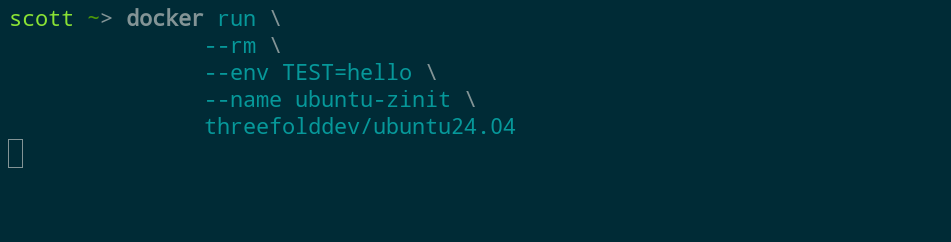
In the first shell I just start the container and let it run (this will kick off zinit):
image

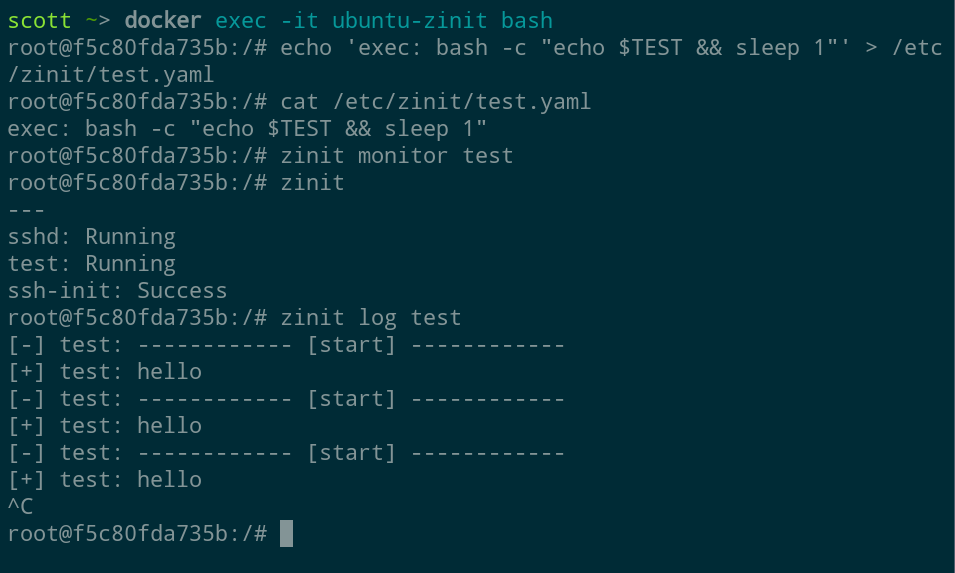
Then in a second shell I connect to the container and demonstrate how a simple zinit service accesses the environment variable:

image

Whereas with Docker we use --env to set the variable value, in our VMs we set them via the deployment tool or SDK.

thanks a lot for the explanation, very much appreciated!

that brings me much closer to develop my own flist(s).

2 Likes

My pleasure! Let me know if I can answer any other questions.

ok ))

  • Could you explain why the zinit repo is now archived (read only)?
    https://github.com/threefoldtech/zinit

  • Will there be any (big) changes for the (micro-) vm deloyments in the next grid version (v4)?

  • do i understand the documentation right, that the micro vm is run as a linux container and the full vm on a (xen or other) hypervisor?

  • Then the nextcloud (aio) lab deployment runs on a micro vm (b/c it’s based on a flist);
    but in this case the nc-aio mastercontainer downloads and starts/administers multiple other containers. That would mean there is a docker install within an already running (docker) container?

I’m especially interested in the nc deployment b/c i would (for example) like to also mount an additional backup disk but there’re no further config options when using the official lab deployment.

We are migrating to a self hosted git forge. Zinit can be found here now: https://forge.ourworld.tf/geomind_code/zinit

This is still a work in progress, but I think we’ll have similar support for the micro VM images like we use in v3.

Micro VMs are VMs. The connection to Docker comes from:

  1. The fact that we support converting Docker images to our VM image format
  2. Some aspects are in the spirit of containers, like the environment variables and entrypoint settings

A micro VM is provided with a generic kernel by Zos. Thus the image doesn’t need to contain a kernel (it can be as small as a single binary, just like a container). Zos also provides a small initramfs that does a couple things like setting up the disks and the networking before launching the entrypoint.

So Docker can run fine inside a micro VM, with a caveat about where the data is stored.

There are a couple of ways to customize the deployment. One would be to use the micro VM deployment flow in the dashboard and fill in the env variables manually. Then you could add the additional disk. Another would be to use Terraform with the official flist image (if this interest you I can provide a template).

I think adding and using a backup disk should work fine without needing to customize the flist actually.

Thanks again for the explanation!

Yes, please share a terraform template, should be similar to the one in the documentation.

1 Like