Billing on the ThreeFold Grid includes discounts based on the balance held in the users wallet. Holding large balances in wallets used for deployment can be somewhat risky though, since the wallet secret must be used to deploy. In order to address this situation, TFChain supports the concept of a stash account.
A stash account is a second account whose balance is counted toward the discount level of another account. These accounts are said to be bonded together. This functionality isn’t exposed via our Dashboard or mobile app. It can be accessed via the Polkadot UI. A guide for doing that follows.
Polkdadot UI basics
The Polkadot UI is a general purpose interface for working with Substrate/Polkadot SDK based blockchains, such as TFChain. It’s part of the Polkadot.js project.
To use the UI, first install the browser extension: https://polkadot.js.org/extension/
Import the seed phrase from your stash account (with the large balance) into the extension:
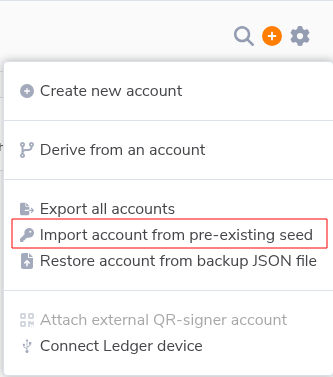
Once you’re done, the account will show up within the extension. To connect the account to the UI web app requires one more step.
Connect extension to UI
Open the UI page: https://polkadot.js.org/apps/?rpc=wss%3A%2F%2Ftfchain.grid.tf
Then open the extension again and hit Connect Accounts:
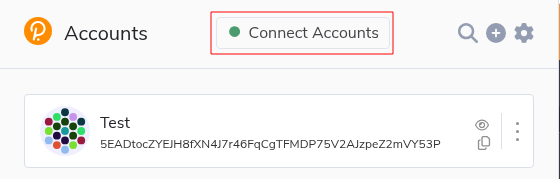
Check the box for your account and hit the big orange button:
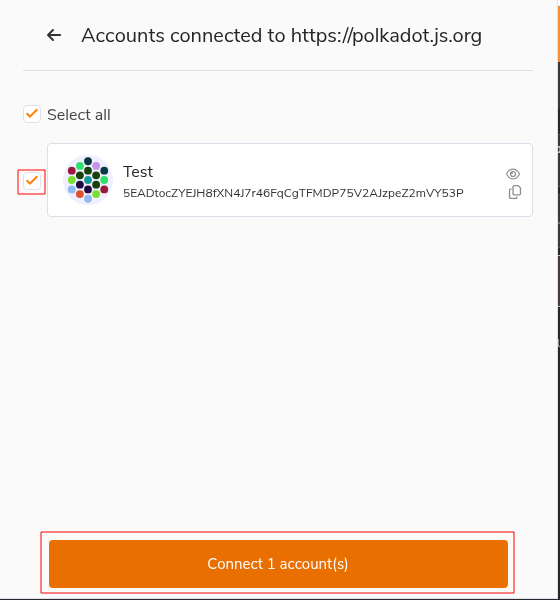
Now the account will also be available to use within the UI.
Extrinsics
Actions available to users on TFChain are known as extrinsics. We need to execute one in order to bond our stash account to our deployment account.
Visit this link for TFChain extrinsics: https://polkadot.js.org/apps/?rpc=wss%3A%2F%2Ftfchain.grid.tf#/extrinsics
Choose tfgridModule and bondTwinAccount. Then enter the twin ID of your deployment account into the field (example twin ID 42 shown below):
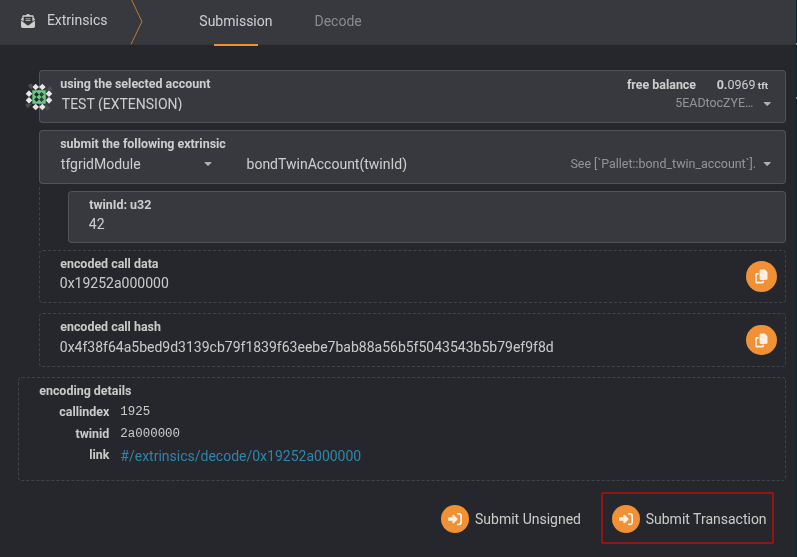
Then hit Submit Transaction and sign with the extension. After that, the balance of the stash account will be considered when calculating discounts for the bonded account.